
Table of Contents
- What Is a Shopify Landing Page for Meta Ads?
- Why Your Shopify Homepage May Not Be the Best Ad Destination
- How Meta Ad Traffic Differs From Google Search Traffic
- The Anatomy of a High-Converting Shopify Landing Page
- Step 1: Define One Clear Campaign Objective
- Step 2: Match Your Landing Page With Your Meta Ad
- Step 3: Create a Strong Above-the-Fold Section
- Step 4: Design for Mobile-First Shopping
- Step 5: Write Product Copy That Supports Purchasing Decisions
- Step 6: Add Genuine Social Proof and Trust Signals
- Step 7: Make Product Selection and Checkout Easy
- Step 8: Improve Shopify Landing Page Speed
- Step 9: Set Up Meta Pixel and Conversions API
- Step 10: Test and Optimize Landing Page Performance
- How to Create a Landing Page in Shopify
- Example of a Shopify Landing Page for Meta Ads
- Shopify Landing Page vs Product Page vs Homepage
- Important Landing Page Metrics to Track
- Common Shopify Landing Page Mistakes
- 30-Day Shopify Landing Page Optimization Plan
- Frequently Asked Questions
You're running Meta Ads for your Shopify store. Your Instagram Reels are getting attention, your Facebook advertisements are generating clicks and visitors are arriving at your website.
But there's one problem.
Those visitors aren't buying.
You review your advertising dashboard, adjust your targeting and experiment with different creatives. Yet the return on advertising spend remains disappointing.
What if the problem isn't your Meta Ads campaign?
What if the problem is the page customers see after clicking your advertisement?
Many ecommerce businesses invest substantial time and money into advertising creatives, audience targeting and campaign management. However, they often overlook one of the most important parts of the customer journey: the landing page.
A customer might click an advertisement because a product looks interesting or an offer seems relevant.
But if the destination page is slow, confusing or unrelated to the advertisement, that initial interest can disappear quickly.
A high-converting Shopify landing page helps connect advertising attention with a clear purchasing decision.
It presents the right product, explains its value, answers important questions and guides shoppers toward checkout without unnecessary friction.
However, creating an effective landing page requires more than adding an attractive banner and a Buy Now button.
Businesses must consider customer intent, mobile usability, page performance, product information, trust signals, conversion tracking and campaign consistency.
In this guide, we'll explain how to build a Shopify landing page specifically for Facebook and Instagram advertising.
You'll learn which page elements matter, how to create a campaign-specific experience, how to measure performance and which mistakes to avoid.
We'll also explore how Shopify website design, custom development, Meta Ads management and conversion rate optimization work together to support ecommerce sales.
Quick Answer: What Makes a Shopify Landing Page Convert for Meta Ads?
A high-converting Shopify landing page should closely match the advertisement that brought visitors to the store.
It needs a clear headline, relevant product imagery, a strong value proposition, transparent pricing, trustworthy information and one obvious primary action.
The page should load efficiently on mobile devices, make product selection easy and provide a reliable path to checkout.
Businesses should also configure appropriate conversion tracking and use actual customer behavior to guide improvements.
No landing page can guarantee sales, but reducing unnecessary friction and addressing relevant customer questions can improve the shopping experience.
What Is a Shopify Landing Page for Meta Ads?
A Shopify landing page for Meta Ads is a webpage designed to receive visitors from advertising campaigns on Facebook, Instagram and other supported Meta placements.
Its purpose is to guide those visitors toward a specific business objective.
For ecommerce businesses, that objective is often a product purchase.
However, campaigns may also focus on generating inquiries, collecting qualified leads or introducing a particular product collection.
Unlike a general homepage, an advertising landing page usually focuses on a limited set of products, messages or offers.
Example of a Campaign-Specific Landing Page
Imagine a skincare brand launching a new moisturizer.
The Meta advertisement highlights three product characteristics:
- Lightweight Formula
- Daily Hydration
- Suitable for the Intended Skin Types
The advertisement directs customers to a dedicated Shopify landing page featuring that moisturizer.
The page explains the product's verified benefits, displays relevant photographs and helps customers select the appropriate size.
It also includes genuine customer reviews and clear purchasing information.
This creates a more consistent journey than sending visitors to a homepage displaying unrelated product collections.
Does Every Meta Ad Need a Separate Landing Page?
No.
A well-designed product page can sometimes be the most suitable destination.
For example, if an advertisement promotes a single product and the existing product page communicates its value effectively, a separate landing page may be unnecessary.
Dedicated pages become more useful when the campaign has a particular audience, seasonal offer, product bundle or message that the standard page cannot present clearly.
The goal is relevance, not creating more pages for their own sake.
Why Your Shopify Homepage May Not Be the Best Ad Destination
A homepage serves several purposes.
It introduces the brand, displays featured collections, provides navigation and helps customers discover different products.
A Meta Ads landing page usually needs a more focused approach.
Imagine an advertisement promoting a specific pair of running shoes.
The customer clicks because they want to see the shoes.
But instead of landing on the advertised product, they arrive on a homepage showing new arrivals, accessories and unrelated categories.
The shopper must search again.
That additional effort can create unnecessary friction.
Homepage vs Dedicated Landing Page
| Feature | Shopify Homepage | Meta Ads Landing Page |
|---|---|---|
| Main Purpose | Introduce the brand | Support one campaign objective |
| Content | Multiple collections and messages | Specific product or offer |
| Navigation | Broad website exploration | Focused purchasing journey |
| Primary Audience | Different visitor types | Campaign-specific audience |
| Main CTA | Shop or explore categories | Buy, select product or complete a defined action |
| Message | General brand proposition | Closely aligned with the advertisement |
| Measurement | General storefront performance | Campaign-specific performance |
When the Homepage Can Still Work
A homepage may be appropriate for brand awareness campaigns or broader campaigns introducing the entire business.
However, for product-specific sales campaigns, a relevant product or campaign page is often a better starting point.
Before choosing the destination, ask:
"What information does the customer expect immediately after clicking this ad?"
The landing page should provide that information without requiring additional searching.
How Meta Ad Traffic Differs From Google Search Traffic
Understanding customer intent is essential when creating landing pages.
Meta Ads and Google Search frequently reach customers at different stages of the shopping journey.
Google Search Traffic
A shopper using Google may search for a specific product.
For example:
"Buy black running shoes size 9"
This indicates an existing product requirement.
A relevant product page with clear pricing and availability may be sufficient.
Meta Ads Traffic
A customer browsing Instagram may not be actively looking for running shoes.
They see an advertisement demonstrating a new pair and become interested.
Their intent develops because of the advertisement.
The landing page must therefore explain why the product deserves consideration.
What This Means for Landing Page Design
Meta traffic may benefit from additional product context.
Useful content can include demonstrations, verified benefits, customer reviews and answers to common objections.
However, not every shopper needs a lengthy sales page.
An audience already familiar with your brand may prefer a shorter route to purchasing.
The right page length depends on product complexity, customer familiarity and purchasing intent.
The Anatomy of a High-Converting Shopify Landing Page
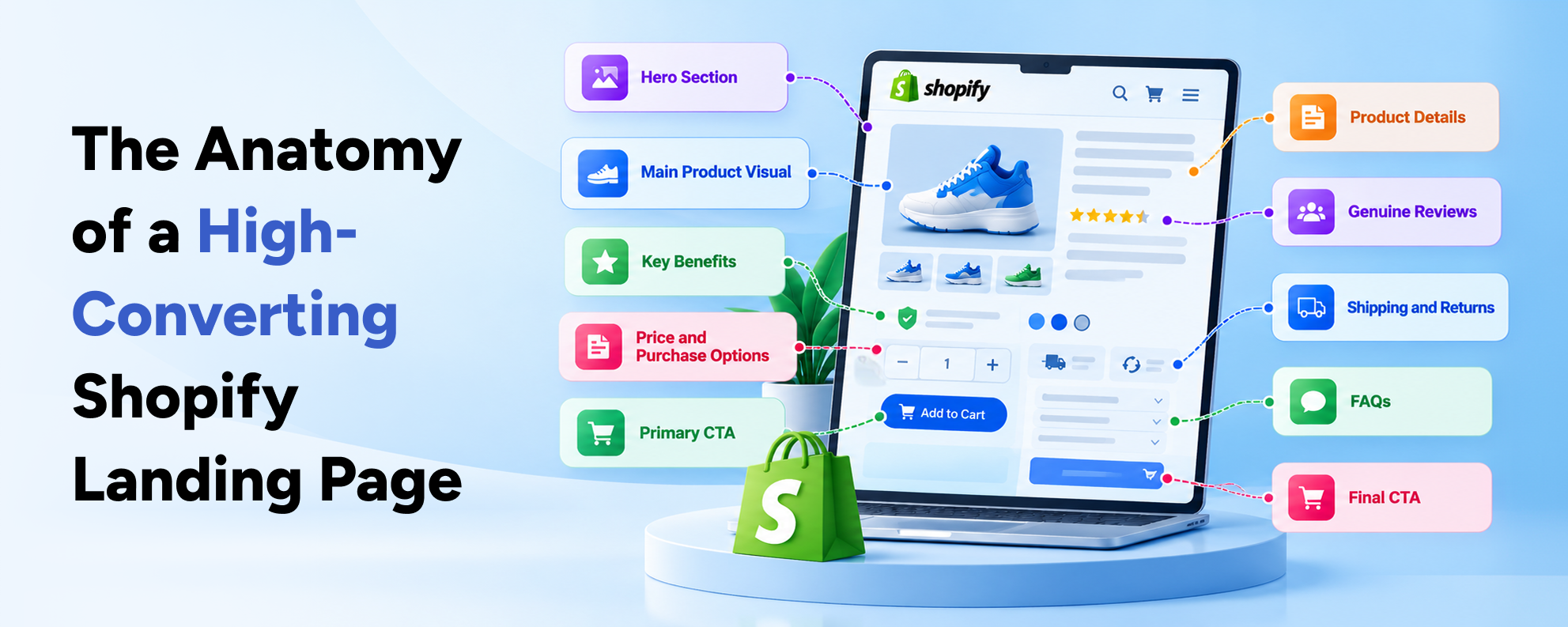
A good landing page follows a logical information hierarchy.
Customers should understand the offer before being asked to make a decision.
Recommended Landing Page Structure
| Page Section | Purpose |
|---|---|
| Hero Section | Confirm the product and advertising message |
| Main Product Visual | Show what the customer is considering |
| Key Benefits | Explain relevant product value |
| Price and Purchase Options | Help customers evaluate the offer |
| Primary CTA | Provide a clear next action |
| Product Details | Answer practical questions |
| Genuine Reviews | Provide customer feedback |
| Shipping and Returns | Reduce uncertainty |
| FAQs | Address remaining objections |
| Final CTA | Give interested shoppers another purchasing opportunity |
This structure is not a rigid template.
A simple product might need fewer sections.
A higher-priced or unfamiliar product may require more explanation.
The essential principle is to present useful information in the order customers need it.
Step 1: Define One Clear Campaign Objective
Before designing the landing page, determine what action you want visitors to take.
For an ecommerce sales campaign, the primary objective is commonly a completed purchase.
However, some campaigns promote product discovery or lead generation.
Common Landing Page Objectives
A Shopify store might create landing pages for:
- A Single Product Launch
- A Product Bundle
- A Seasonal Collection
- A Limited-Time Promotion
- A Subscription Offer
- A Product Sample Campaign
- A Wholesale Inquiry Campaign
Each objective requires different content and purchasing controls.
Example: Product Sales vs Wholesale Inquiries
A consumer product landing page may focus on product photography, pricing and Add to Cart functionality.
A wholesale landing page may need eligibility information, minimum order quantities and a business inquiry form.
Combining both audiences on one campaign page can create confusion.
How to Choose the Main CTA
Your primary button should reflect the intended customer action.
Examples include:
- Shop the Collection
- Add to Cart
- Buy Now
- Choose Your Bundle
- View Product Options
- Request Wholesale Pricing
Avoid introducing several competing primary actions.
Customers should understand what to do next.
Step 2: Match Your Landing Page With Your Meta Ad
Ad-to-page consistency is one of the most important aspects of ecommerce landing page design.
The customer clicks an advertisement because something attracts their attention.
The landing page should continue that same message.
What Should Match?
Consider five elements.
1. Product
Show the product featured in the advertisement.
If the creative promotes a blue backpack, the landing page should not unexpectedly display a different item.
2. Offer
If the advertisement promotes a discount, the landing page should explain the same offer accurately.
For example:
Ad: Save 15% on Selected Running Shoes
Landing Page: Save 15% on Eligible Running Shoes
The relevant discount terms should remain accessible.
3. Visual Identity
Use consistent product imagery, colors and brand presentation.
Customers should immediately recognize that they reached the intended destination.
4. Headline
The landing page headline should reinforce the advertisement's central promise.
It does not need to repeat every word, but the meaning should remain consistent.
5. Call to Action
If the advertisement encourages customers to shop a product, the landing page should make that action easy.
Example: Poor vs Better Message Match
| Ad Element | Poor Landing Page | Better Landing Page |
|---|---|---|
| Ad promotes a skincare bundle | Generic skincare homepage | Dedicated bundle page |
| Ad promises free delivery above a threshold | Shipping terms are hidden | Relevant threshold clearly displayed |
| Ad features a specific product | Unrelated bestseller shown first | Advertised product shown immediately |
| Ad highlights product benefits | Only a generic brand message | Verified benefits explained |
| Ad says "Shop Now" | Page requires an unrelated inquiry form | Direct shopping action available |
Meta's Landing Page Standards
Meta reviews advertising destinations as part of its advertising policies.
Its advertising training emphasizes that landing pages should accurately represent the advertised business, product or service.
Misleading offers, broken destinations and disruptive experiences may lead to ad rejection or other restrictions.
You can review Meta's Advertising Standards and Blueprint landing page training.
The practical lesson is straightforward: make sure the advertisement and destination provide the same honest customer experience.
Step 3: Create a Strong Above-the-Fold Section
The above-the-fold area is the first portion of a webpage visible before a customer scrolls.
On mobile devices, this space is limited.
Your landing page must communicate the most important information without overcrowding it.
What Should Appear Near the Top?
For a product-focused campaign, prioritize:
- Clear Product Name or Main Headline
- Relevant Product Image
- Concise Value Proposition
- Price or Offer
- Important Product Options
- Primary Purchase Button
Additional information can appear lower on the page.
Example of a Strong Hero Section
Imagine a campaign promoting a reusable water bottle.
A suitable headline might be:
"Your Everyday Bottle for Work, Travel and Training"
Supporting copy:
"Explore our insulated stainless steel bottle with a leak-resistant lid and convenient carrying design."
Primary CTA:
"Choose Your Bottle"
This is an illustrative example. Any product features used in a real campaign must be accurate.
Avoid Generic Headlines
A headline such as "Welcome to Our Store" does little to explain why a customer should continue.
Likewise, broad phrases such as "Discover Quality and Excellence" may sound appealing but provide limited purchasing information.
A useful headline communicates a clear product benefit or reason to explore.
Should You Remove the Website Navigation?
A reduced navigation menu can help keep campaign visitors focused.
However, completely removing navigation is not always necessary or beneficial.
Customers may need access to product information, customer support, shipping policies and other important pages.
For ecommerce campaigns, balance focus with accessibility and trust.
Step 4: Design for Mobile-First Shopping
Meta advertising frequently reaches customers through mobile feeds, Stories and Reels.
As a result, mobile usability should be central to landing page design.
A desktop layout that looks impressive can still create problems on a smartphone.
Important Mobile Design Elements
Readable Typography
Use fonts large enough to read comfortably.
Avoid placing important information in tiny labels or crowded text blocks.
Accessible Buttons
Purchase buttons should be easy to identify and tap.
Allow appropriate spacing between controls.
Optimized Product Images
Product photography should display clearly without forcing customers to zoom excessively.
Where relevant, provide a swipeable gallery.
Simple Product Selection
Sizes, colors and quantities should be easy to select.
Avoid complicated dropdowns or controls that become difficult to use on small screens.
Visible Purchasing Information
Important details such as pricing, availability and shipping conditions should be easy to locate.
Should You Use a Sticky Add to Cart Button?
A sticky purchase button can make the main action accessible as visitors scroll.
This may be useful on long mobile landing pages.
However, it should not block product content, navigation or consent controls.
The button also needs to reflect the selected product variant correctly.
Test the In-App Browser Experience
Customers may open your website inside Facebook or Instagram's browser.
Test the complete journey in those environments where possible.
Check that images load correctly, product selectors work and the checkout remains usable.
A landing page should work effectively where customers actually encounter it, not just in your desktop browser.
Step 5: Write Product Copy That Supports Purchasing Decisions
Copywriting affects how customers evaluate a product.
Your landing page should explain what the product is, why its features matter and whether it meets the customer's needs.
Focus on Product Benefits and Supporting Facts
Consider a skincare product with the following verified characteristics:
- Lightweight Texture
- Fragrance-Free Formula
- Suitable for the Intended Use
- Convenient Pump Packaging
Instead of presenting only technical attributes, explain how those characteristics affect the purchasing decision.
For example:
"Explore a lightweight, fragrance-free moisturizer with convenient pump packaging for everyday use."
This provides more context without making unsupported performance claims.
Keep Paragraphs Short
Mobile visitors may scan rather than read every section.
Use short paragraphs, descriptive subheadings and relevant lists.
Avoid repeating the same benefit in several sections.
Answer Common Customer Questions
Product-specific questions may involve:
- What Is Included?
- Which Size Should I Choose?
- What Materials or Ingredients Are Used?
- How Do I Use the Product?
- How Long Does Delivery Take?
- What Is the Return Policy?
- Is the Product Compatible With My Needs?
These questions should guide the content.
Use Comparison Tables When Helpful
For example, a product available in two sizes might benefit from a simple comparison.
| Product Option | Size | Suitable Purchasing Need |
|---|---|---|
| Standard | 250 ml | Customers seeking a smaller quantity |
| Large | 500 ml | Customers who prefer a larger quantity |
Do not add comparison tables merely to make the page longer.
Use them when customers genuinely need help choosing.
Step 6: Add Genuine Social Proof and Trust Signals
Customers discovering a brand through social advertising may have limited familiarity with the business.
Trust signals help them evaluate whether the store is reliable.
However, trust must be supported by genuine information.
Customer Reviews
Authentic reviews can provide useful insight into product quality and the purchasing experience.
For example, customers may describe product fit, packaging, usage or delivery.
Where available, display verified customer feedback with appropriate context.
Avoid fabricated reviews and unsupported five-star ratings.
Product Demonstrations
A short demonstration can show how a product works.
For fashion, this may involve fit and movement.
For electronics, it may involve features and usability.
For beauty products, it could show packaging, application or texture, provided any performance claims are supportable.
Shipping and Return Information
Clear delivery and return policies help customers understand what happens after purchase.
Avoid hiding important conditions until checkout.
Business Contact Details
Provide accessible customer support information.
Customers should be able to understand who is selling the product and how to contact the business.
Secure Checkout Information
Explain supported payment methods accurately.
Use genuine security and payment information rather than misleading badges.
Why Trust Placement Matters
Customers may hesitate immediately before adding a product to their cart.
Relevant reassurance close to purchasing controls can help answer those concerns.
However, too many badges, testimonials and popups can create clutter.
The objective is to provide credible information, not overwhelm visitors.
Step 7: Make Product Selection and Checkout Easy
A successful landing page must connect the advertisement to a working purchase process.
Even interested customers can leave if the purchasing interaction is difficult.
Common Product Selection Problems
These include:
- Unclear Size Selection
- Missing Product Availability
- Variant Images Not Updating
- Confusing Quantity Controls
- Nonfunctional Add to Cart Buttons
- Incorrect Discount Application
- Unexpected Shipping Costs
These issues require technical and usability testing.
Use a Clear Purchase Button
The main button should visually stand out from secondary actions.
A consistent design helps customers recognize where to continue.
For example, a blue Add to Cart button may stand out against a light product layout.
However, color alone is not enough.
Button text, placement and accessibility also matter.
Display Pricing Transparently
If a product is discounted, ensure the original price and current price are accurate.
Explain promotion terms where necessary.
Avoid showing an exaggerated reference price simply to create urgency.
Minimize Unnecessary Checkout Friction
Shopify provides a managed checkout experience.
Businesses should configure available payment methods, shipping information and customer requirements correctly.
Accelerated payment methods such as Shop Pay may also be useful for eligible merchants and customers.
However, availability depends on payment configuration and geography.
Test the Complete Journey
Before running advertisements, perform realistic purchase tests.
Check product selection, cart behavior, shipping calculations and payment methods.
If the store supports several markets, test relevant international purchasing scenarios.
An attractive landing page is ineffective if customers cannot complete an order.
Step 8: Improve Shopify Landing Page Speed
Page performance is especially important for paid advertising because businesses pay to attract visitors.
Slow loading can create frustration before customers have an opportunity to evaluate the offer.
Common Shopify performance issues include oversized images, unnecessary scripts, multiple marketing tags and inefficient custom components.
Google's Core Web Vitals
Google recommends the following performance thresholds for a good user experience:
| Metric | Recommended Threshold |
|---|---|
| Largest Contentful Paint | 2.5 seconds or less |
| Interaction to Next Paint | 200 milliseconds or less |
| Cumulative Layout Shift | 0.1 or less |
These thresholds are assessed using the 75th percentile of real-world page experiences.
Source: Google Web Vitals.
How to Improve Landing Page Performance
Optimize Hero Images
Use appropriately sized images and modern formats where supported.
Avoid uploading unnecessarily large files.
Review Third-Party Scripts
Multiple applications can introduce additional JavaScript and external requests.
Audit scripts that are not required for the landing page.
Avoid Excessive Animations
Animations should support the experience rather than delay access to important information.
Prioritize Important Content
Ensure the primary product image and main purchasing information load promptly.
Review Theme Architecture
Poorly implemented custom sections may affect page rendering and interaction.
Custom Shopify development can help businesses address technical issues that basic theme configuration cannot resolve.
Use Real-World Performance Data
Test with PageSpeed Insights and relevant Shopify performance reports.
Don't rely entirely on one laboratory score.
Actual mobile customer experiences provide more useful evidence of whether improvements are necessary.
Step 9: Set Up Meta Pixel and Conversions API
Without reliable conversion tracking, businesses may struggle to understand whether landing page visitors become customers.
Meta Pixel and Conversions API help merchants measure relevant customer actions and support advertising optimization.
What Is Meta Pixel?
Meta Pixel is a browser-based tracking technology that can collect information about supported customer interactions.
Examples include:
- PageView
- ViewContent
- AddToCart
- InitiateCheckout
- Purchase
The available events depend on the integration and customer data-sharing settings.
What Is Conversions API?
Meta Conversions API allows supported events to be transmitted through server-based integrations rather than relying only on the browser.
This can help provide additional event information where permitted.
However, it does not eliminate privacy obligations, consent requirements or tracking limitations.
How to Connect Meta Tracking With Shopify
Shopify provides an official Facebook and Instagram by Meta sales channel.
The setup process generally involves:
- Opening Shopify Admin.
- Accessing the Facebook and Instagram sales channel.
- Connecting the appropriate Meta business assets.
- Reviewing customer data-sharing settings.
- Connecting an existing Meta Pixel or creating one.
- Selecting the appropriate data-sharing level.
- Confirming the integration.
- Testing events in Meta Events Manager.
Shopify currently provides Standard, Enhanced and Maximum customer data-sharing options.
Enhanced and Maximum use Conversions API alongside the Pixel, subject to their respective settings.
Read Shopify's Meta Pixel Guide and Facebook Data Sharing Documentation.
Avoid Duplicate Tracking
A common technical mistake is installing multiple versions of the same Pixel.
For example, a merchant might connect the official Shopify integration and also manually insert another tracking script.
This can produce inaccurate event reporting.
If browser and server events are both used, confirm that Meta's event deduplication is functioning correctly.
Review event diagnostics before relying on reported conversions.
Remember Customer Privacy
Data-sharing settings must reflect applicable privacy and consent requirements.
Businesses should maintain an accurate privacy policy and configure their tracking systems appropriately.
Not every customer interaction can or should be tracked.
Use UTM Parameters
UTM parameters help identify advertising traffic in analytics tools.
For example, a campaign URL might include:
?utm_source=facebook&utm_medium=paid_social&utm_campaign=summer_launch&utm_content=video_a
This can help distinguish campaigns and creatives in analytics reporting.
Use consistent naming conventions across campaigns.
Avoid placing personal or sensitive information in tracking URLs.
Step 10: Test and Optimize Landing Page Performance
A landing page should not be treated as a one-time design project.
Customer behavior, advertising creatives and product offers can change.
Continuous evaluation helps businesses identify what works.
Start With a Performance Baseline
Before making changes, record the relevant metrics.
For a sales campaign, these may include:
- Landing Page Sessions
- Product Views
- Add-to-Cart Rate
- Checkout Initiation
- Purchase Conversion Rate
- Cost Per Purchase
- Revenue Per Session
Without baseline data, it becomes difficult to determine whether a change improved performance.
Use A/B Testing Where Practical
A/B testing compares alternative experiences.
For example, a business may test:
Version A: Product image beside a short headline.
Version B: Product demonstration video beside the same headline.
Both versions should retain the same product pricing and purchasing conditions.
This helps isolate the impact of the presentation.
What Should You Test?
| Element | Potential Test |
|---|---|
| Headline | Product-focused vs benefit-focused |
| Hero Visual | Product photograph vs demonstration |
| CTA Copy | Add to Cart vs Choose Your Product |
| Product Information | Short summary vs structured feature explanation |
| Social Proof | Reviews near CTA vs later on page |
| Mobile Layout | Standard button vs accessible sticky CTA |
| Product Offer | Individual product vs relevant bundle |
| Page Structure | Short vs more detailed explanation |
Avoid Changing Everything at Once
If you change the headline, imagery, pricing and checkout behavior simultaneously, it becomes difficult to identify what caused a performance difference.
Prioritize meaningful hypotheses and test changes systematically.
Consider Statistical Reliability
A small number of conversions can produce misleading results.
For example, a page receiving five purchases in one week and seven in the next has not necessarily demonstrated a reliable improvement.
Use appropriate experiment design, sufficient sample sizes and consistent measurement.
For low-traffic stores, qualitative usability research may provide more value than underpowered A/B tests.
How to Create a Landing Page in Shopify
Shopify offers several methods for creating campaign-specific landing pages.
The best option depends on the theme, design requirements and available technical resources.
Method 1: Use Shopify's Native Theme Editor
For compatible themes, merchants can create an alternative page template.
A typical workflow is:
- Open Shopify Admin.
- Go to Online Store.
- Create a new page under Pages.
- Open the theme editor.
- Create a suitable page template.
- Add relevant sections and blocks.
- Configure the content.
- Assign the template to the new page.
- Preview the page on desktop and mobile.
- Publish after testing.
The available components depend on the Shopify theme.
Some themes provide extensive page-building options, while others require additional development.
Shopify's Theme Templates Documentation explains how alternative templates work.
Method 2: Use a Compatible Landing Page Builder
Third-party landing page applications can provide additional layouts and visual controls.
This may be useful for marketing teams that regularly launch campaigns.
However, applications can introduce recurring fees, additional scripts and maintenance requirements.
Evaluate:
- Theme Compatibility
- Page Performance
- Shopify Product Integration
- Checkout Behavior
- Analytics Support
- Mobile Responsiveness
- Application Pricing
Avoid selecting an application based only on the number of available templates.
Method 3: Develop a Custom Shopify Landing Page
A custom landing page may be appropriate when a business requires a distinctive layout or specialized purchasing experience.
Examples include:
- Interactive Product Configurators
- Advanced Product Bundles
- Custom Subscription Selection
- Region-Specific Campaign Pages
- Specialized Product Comparisons
- Unique Mobile Shopping Experiences
Custom development allows more control over functionality and design.
However, it requires careful implementation, testing and maintenance.
Which Method Should You Choose?
| Approach | Advantages | Considerations | Suitable For |
|---|---|---|---|
| Native Shopify Template | Uses existing theme infrastructure | Limited by available sections | Simple campaigns |
| Landing Page Builder | Flexible visual editing | Subscription costs and app dependencies | Frequent marketing campaigns |
| Custom Development | Tailored design and functionality | Higher implementation effort | Specialized campaigns and growing brands |
Professional Shopify website design can help businesses decide which approach supports their campaign and customer requirements.
Example of a Shopify Landing Page for Meta Ads
Let's examine a hypothetical fitness apparel campaign.
The brand sells performance leggings and wants to promote a new product through Instagram Reels.
Campaign Overview
Product: Women's Training Leggings
Target Audience: Customers interested in relevant fitness apparel
Primary Goal: Generate product purchases
Meta Ad Format: Short vertical product demonstration
Landing Page: Dedicated product-focused Shopify page
Meta Ad Concept
The video shows the leggings during relevant workout movements.
The creative highlights verified product characteristics such as fit, fabric composition and available colors.
The closing message encourages customers to explore the collection.
Recommended Landing Page Layout
Section 1: Hero
Headline:
"Training Leggings Designed for Your Everyday Workouts"
Supporting text:
"Explore flexible training leggings with a supportive fit, available in a selection of colors and sizes."
Primary CTA:
"Choose Your Size"
Section 2: Product Demonstration
Display photographs or videos showing the product from different angles.
Customers should be able to understand fit and appearance.
Section 3: Key Product Information
Explain the material, sizing and care instructions.
Include a relevant size guide.
Section 4: Product Selection
Display available colors, sizes, price and stock status.
Ensure the controls work on mobile devices.
Section 5: Genuine Customer Reviews
Show relevant, authorized customer feedback.
Do not invent testimonials or ratings.
Section 6: Delivery and Returns
Explain expected delivery options and applicable return conditions.
Section 7: Product FAQs
Answer questions about sizing, fabric, washing and product care.
Section 8: Final CTA
Repeat the main purchasing action.
Why This Layout Makes Sense
The customer arrives after watching a product demonstration.
The landing page continues that experience with relevant imagery and buying information.
It answers the questions a shopper might have before purchasing.
The structure reduces unnecessary navigation without withholding important details.
A Second Example: Skincare Bundle Campaign
Now imagine a skincare brand promoting a three-product bundle.
The advertisement introduces the products as a coordinated routine.
The landing page should explain what each product does, identify the items included and show the bundle's actual price.
If a discount is available, the savings must be accurate.
A customer should not have to open three separate product pages merely to understand the offer.
This illustrates why the landing page must reflect the product and campaign rather than follow a generic design template.
These examples are illustrative, not real client campaign results.
Shopify Landing Page vs Product Page vs Homepage
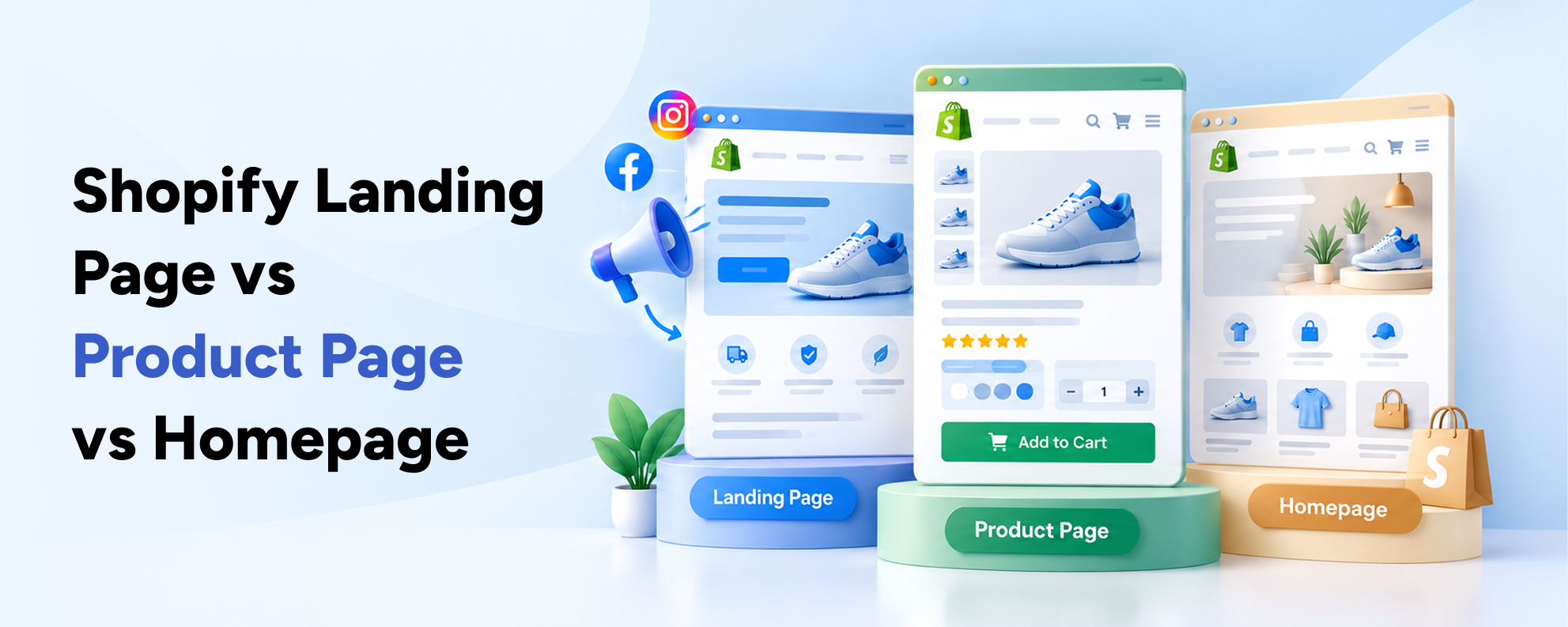
Businesses sometimes assume that every paid advertisement requires a custom landing page.
That is not always the most efficient approach.
The best destination depends on the specific campaign.
| Factor | Homepage | Standard Product Page | Dedicated Landing Page |
|---|---|---|---|
| General Brand Campaigns | Suitable | Limited relevance | Sometimes useful |
| Single Product Promotion | Usually less focused | Often suitable | Suitable |
| Special Campaign Offer | May create distractions | May require customization | Often useful |
| Product Bundle Campaign | Usually less focused | Suitable if supported | Often useful |
| Detailed Product Education | General | Product-specific | Highly customizable |
| Unique Ad Messaging | Limited | Some flexibility | Strong flexibility |
| Development Effort | Existing page | Existing or modified template | Additional configuration or development |
When to Use a Standard Product Page
Use a standard product page when the existing experience already answers customer questions and provides a clear purchase path.
When to Use a Dedicated Landing Page
Use a campaign-specific page when you need unique messaging, product combinations, promotions or a more focused customer journey.
When to Use the Homepage
Consider the homepage for broad brand discovery campaigns rather than highly specific product sales campaigns.
The objective is to select the destination that best matches visitor expectations.
Important Landing Page Metrics to Track
A successful campaign should be measured by more than clicks.
Different metrics reveal different stages of the purchasing journey.
1. Link Clicks
Link clicks indicate interactions with links in advertisements.
However, not every click results in a completed page load.
2. Landing Page Views
Landing page views represent visits that satisfy Meta's relevant landing page measurement conditions.
These can differ from link clicks.
A substantial gap may justify investigating loading performance, tracking and destination behavior.
3. Add-to-Cart Rate
This measures how often visitors add products to their carts.
For example:
1,000 landing page sessions
80 sessions with cart additions
Add-to-cart rate = 8%
Use consistent session-based or event-based definitions when comparing data.
4. Purchase Conversion Rate
This measures the percentage of eligible sessions resulting in completed purchases.
For example:
1,000 sessions
25 purchasing sessions
Conversion rate = 2.5%
5. Cost Per Purchase
Cost per purchase indicates the advertising cost associated with an attributed purchase.
A simplified calculation is:
Advertising Spend ÷ Attributed Purchases
For example:
$500 advertising spend ÷ 25 purchases = $20 per purchase.
6. Return on Ad Spend
ROAS measures attributed revenue relative to advertising cost.
For example:
$2,000 attributed revenue ÷ $500 advertising spend = 4× ROAS.
However, ROAS is not the same as profit.
Businesses must consider product costs, fulfillment, returns and other expenses.
7. Revenue Per Session
Revenue per session helps measure the commercial value of store visits.
For example:
$2,000 revenue ÷ 1,000 sessions = $2 revenue per session.
This can be useful when evaluating landing page improvements.
KPI Comparison Table
| KPI | What It Measures | Why It Matters |
|---|---|---|
| Link Clicks | Interactions with advertising links | Initial ad engagement |
| Landing Page Views | Measured arrivals on the destination | Post-click delivery |
| Add-to-Cart Rate | Product purchasing interest | Product and page effectiveness |
| Checkout Initiation | Movement toward payment | Cart-to-checkout progression |
| Purchase Conversion Rate | Completed purchasing sessions | Sales performance |
| Cost Per Purchase | Advertising cost per attributed order | Acquisition efficiency |
| ROAS | Attributed revenue divided by ad spend | Campaign revenue efficiency |
| Revenue Per Session | Revenue generated per session | Overall commercial performance |
A Hypothetical Optimization Example
Imagine a Shopify landing page receiving 3,000 sessions from paid campaigns.
Before optimization:
Conversion Rate: 2%
Purchasing Sessions: 60
After optimization:
Conversion Rate: 3%
Purchasing Sessions: 90
This represents a 50% relative increase in conversion rate.
If each scenario receives the same 3,000 sessions and $1,200 in advertising spend:
Before: $20 cost per purchase.
After: Approximately $13.33 cost per purchase.
These numbers are illustrative and assume comparable traffic, attribution and spending.
They do not represent actual Basiltech client results or a guaranteed performance improvement.
Common Shopify Landing Page Mistakes
Even experienced ecommerce businesses can overlook important landing page problems.
1. Sending Every Advertisement to the Homepage
A general homepage may not provide the specific information customers expect from an ad.
Use more relevant destinations for product-specific campaigns.
2. Promoting an Offer That Is Difficult to Find
If an advertisement highlights a discount, customers should be able to find the relevant offer and conditions easily.
3. Using Low-Quality Product Images
Poor images can make products difficult to evaluate.
Use accurate photography that shows important details.
4. Overloading the Page With Popups
Multiple signup forms, discount prompts and notifications can interrupt the purchasing experience.
Prioritize the customer's main task.
5. Hiding Pricing or Delivery Costs
Unexpected costs may create hesitation.
Communicate important purchasing information clearly.
6. Ignoring Mobile Navigation
A landing page may work on desktop but fail on mobile due to difficult selectors, oversized images or overlapping components.
7. Using Too Many Different CTAs
Competing primary actions can distract visitors.
Keep the main purchasing objective consistent.
8. Displaying Fake Reviews or Unsupported Results
Fabricated testimonials and misleading claims can damage customer trust and create advertising policy concerns.
Use genuine evidence.
9. Installing Multiple Tracking Scripts
Duplicate Pixels or incorrectly configured integrations can distort performance reporting.
Audit the tracking setup.
10. Ignoring Product Availability
Advertisements may continue sending visitors to unavailable products.
Review product feeds, stock status and campaign destinations.
11. Failing to Test Checkout
Product page engagement does not guarantee successful orders.
Check payment methods, shipping configurations and purchasing functionality.
12. Redesigning Without Performance Data
Changing layouts without understanding the underlying problem can waste time and resources.
Use analytics, customer feedback and testing to guide decisions.
For more information about broader ecommerce usability issues, read 12 Shopify Design Mistakes That Hurt Conversion Rates.
30-Day Shopify Landing Page Optimization Plan
Businesses do not need to rebuild their entire Shopify store to improve one advertising campaign.
A structured optimization plan can help prioritize meaningful changes.
Week 1: Audit Your Current Advertising Funnel
Review campaign performance and landing page behavior.
Identify which advertisements drive relevant visitors and where customers leave.
Check tracking accuracy and device performance.
Main deliverable: A prioritized list of measurable problems.
Week 2: Improve the Landing Page Experience
Review the headline, product imagery, pricing, product details and purchasing controls.
Ensure the page matches the advertisement.
Check mobile usability and loading performance.
Main deliverable: An updated landing page ready for testing.
Week 3: Validate Tracking and Purchasing
Test Meta Pixel events and the selected data-sharing configuration.
Check UTM tracking and relevant analytics reports.
Perform realistic product selection and checkout tests.
Main deliverable: A functioning campaign page with validated measurement.
Week 4: Monitor and Optimize
Evaluate performance using comparable data.
Review customer behavior and identify additional friction.
Where traffic permits, run a structured experiment.
Main deliverable: A performance review and next-stage optimization plan.
Implementation Summary
| Week | Main Focus | Key Deliverable |
|---|---|---|
| Week 1 | Research and Audit | Campaign and landing page diagnosis |
| Week 2 | UX and Content Improvements | Updated mobile-first page |
| Week 3 | Technical and Tracking Validation | Tested checkout and analytics |
| Week 4 | Measurement and Optimization | Performance report and improvement roadmap |
What Results Should You Expect?
The first month should help clarify which problems affect customer behavior and which improvements deserve further testing.
A specific conversion improvement cannot be guaranteed.
Results depend on product demand, audience quality, pricing, competition and the existing website experience.
The most valuable outcome is a repeatable process for improving campaign efficiency.
Frequently Asked Questions
What is a Shopify landing page for Meta Ads?
A Shopify landing page for Meta Ads is a webpage designed to receive visitors from Facebook or Instagram advertising campaigns. It usually focuses on a specific product, collection, offer or customer action. The goal is to provide relevant information and guide interested visitors toward the campaign objective.
Do I need a separate landing page for every Facebook Ad?
No. Several ads can direct visitors to the same landing page when they promote the same product and offer. However, campaigns targeting different products, offers or customer needs may benefit from separate destinations. The page should match the visitor's expectations rather than simply exist as an additional URL.
Can I create a landing page directly in Shopify?
Yes. Compatible Shopify themes support alternative page templates that can be customized using sections and blocks. Businesses can also use compatible third-party applications or custom Shopify development. The best method depends on design requirements, functionality, technical resources and ongoing maintenance needs.
Is a Shopify landing page better than a product page for Meta Ads?
Not always. A standard product page can be effective when it provides relevant information and an easy purchasing experience. A dedicated landing page may be more useful for special promotions, product bundles, audience-specific messages or campaigns requiring additional explanation. Both approaches should be evaluated through customer behavior and conversion data.
What should a high-converting Shopify landing page include?
Important elements include a relevant headline, product imagery, clear benefits, transparent pricing, a visible CTA, genuine reviews and accessible shipping information. The page should also work efficiently on mobile devices and provide a reliable route to checkout. The exact structure depends on the product and campaign.
How can I track purchases from Facebook and Instagram Ads on Shopify?
Shopify provides an official Facebook and Instagram by Meta integration that supports Meta Pixel and available Conversions API functionality. Merchants can connect relevant Meta business assets, configure data-sharing settings and test supported events. Tracking must comply with applicable privacy and consent requirements.
How fast should a Shopify landing page load?
Businesses should prioritize a responsive mobile experience and monitor Google's Core Web Vitals. A good Largest Contentful Paint target is 2.5 seconds or less, with Interaction to Next Paint at 200 milliseconds or less and Cumulative Layout Shift at 0.1 or less. Real-world measurements provide more useful insight than relying on a single test score.
Should I remove navigation from my Shopify landing page?
A simplified navigation structure can reduce distractions in some campaigns. However, customers may still need access to relevant product information, customer service and policies. Completely removing navigation is not automatically the best solution. The decision should reflect the campaign objective and customer needs.
Why do my Meta Ads get clicks but no Shopify sales?
Possible causes include low-quality traffic, mismatched advertising messages, slow landing pages, unclear pricing, weak product information and checkout problems. Begin by reviewing the advertising funnel, landing page behavior and actual purchasing events. Avoid increasing the advertising budget before investigating significant conversion issues.
Can landing page optimization reduce Meta Ads costs?
Improving the customer journey can create opportunities to generate more purchases from comparable traffic. This may lower cost per purchase when advertising costs and other conditions remain similar. However, lower acquisition costs are not guaranteed. Meta Ads performance also depends on competition, audience quality, bidding, creative and attribution.